Etsy Thank-You PDF: What Buyers Should Find Behind It

Sellers make an Etsy thank-you PDF because Etsy delivers files, and a file is the only way to hand a buyer more than the listing holds. With Pick Up My Files you don’t build one. We make the thank-you PDF for every listing you connect and attach it on Etsy, and its one button opens your branded download page: a small website for that product, with the buyer’s files and previews, Download all, your how-to steps, answers to common questions and more from your shop.
The thank-you PDF is the first thing a buyer opens after paying, so what it leads to is the first page of your product. When that page is clear and looks like your shop, the buyer downloads, gets started on their own and remembers where it came from. When it’s a bare folder, their first message to you asks where their files are.
Why Etsy sellers attach a PDF at all
Etsy lets a digital listing hold up to five files of 20 MB each.[1] A large clip art set, a digital planner or a wall art bundle in five sizes rarely fits, so the usual answer is a small PDF in one of those slots, pointing to the full set somewhere else. One Etsy detail makes that PDF matter more than it looks: buyers can’t download in the Etsy app. Etsy says buyers “can’t download a digital purchase through the Etsy app at this time” and need a mobile browser or a computer.[2] Our guide to why buyers can’t download digital files on the Etsy app has the steps to give them.
So the PDF is a doorway. What matters is the room it opens onto.
What the buyer should find when they open it
Think about the buyer who has just paid, on their phone, with a project in mind. When they tap the button in their thank-you PDF, they should find:
- Their files, with previews, so they can see what they bought before downloading.
- Download all, so one tap gets everything.
- How-to steps for using, printing or installing the product.
- Answers to the questions buyers usually ask, so they don’t have to message you.
- Your brand, so they know they’re in the right place and who made it.
- More from your shop, so a buyer who liked this product can find the next one on Etsy.
A Pick Up My Files download page is built around that list. You make one template, and every connected listing uses it.
How to do it with Pick Up My Files
1. Connect your Etsy shop
Authorize Pick Up My Files once from your Etsy account. Your digital listings come across with their titles, prices, photos and tags, so there’s nothing to retype. Products you add on Etsy later appear on a later sync.
2. Upload your files and build one page
Upload the files your buyers receive, then design one branded download page for your catalog. The page is a template: it reads the listing each buyer arrived from and shows that product’s files, previews and product guide. One page can serve your whole shop, or you can make separate pages for different product lines. A short checklist on your Home screen walks you through each step.
Because the files sit on the page rather than in Etsy’s file slots, a listing can deliver more than five files, and files larger than 20 MB.
3. Add the blocks that answer buyers
Every new page starts with the essentials in place. Add a product guide block for the how-to steps of each product, a Q&A block for the questions buyers usually message you about, and your public Etsy reviews if you like. On Growth and Pro, a product recommendations block shows your other listings, matched to the purchase, and each one opens on Etsy.
4. Set your Brand Kit
Add your logo and shop name, pick your colours and a font pair, and choose a button style. Readability is checked as you go, so a button label never disappears into its background. Every page that uses your Brand Kit follows it, and a change reaches those pages as soon as you save.
5. Connect a listing, and we attach the PDF
Pick a page and files for the listing. We generate its thank-you PDF and attach it on Etsy for you, on every plan. There’s nothing to design, export or upload. Your listings show which page and files each one delivers and whether its PDF is on Etsy. Listings that need attention stand out, and the ones that are fine stay quiet.
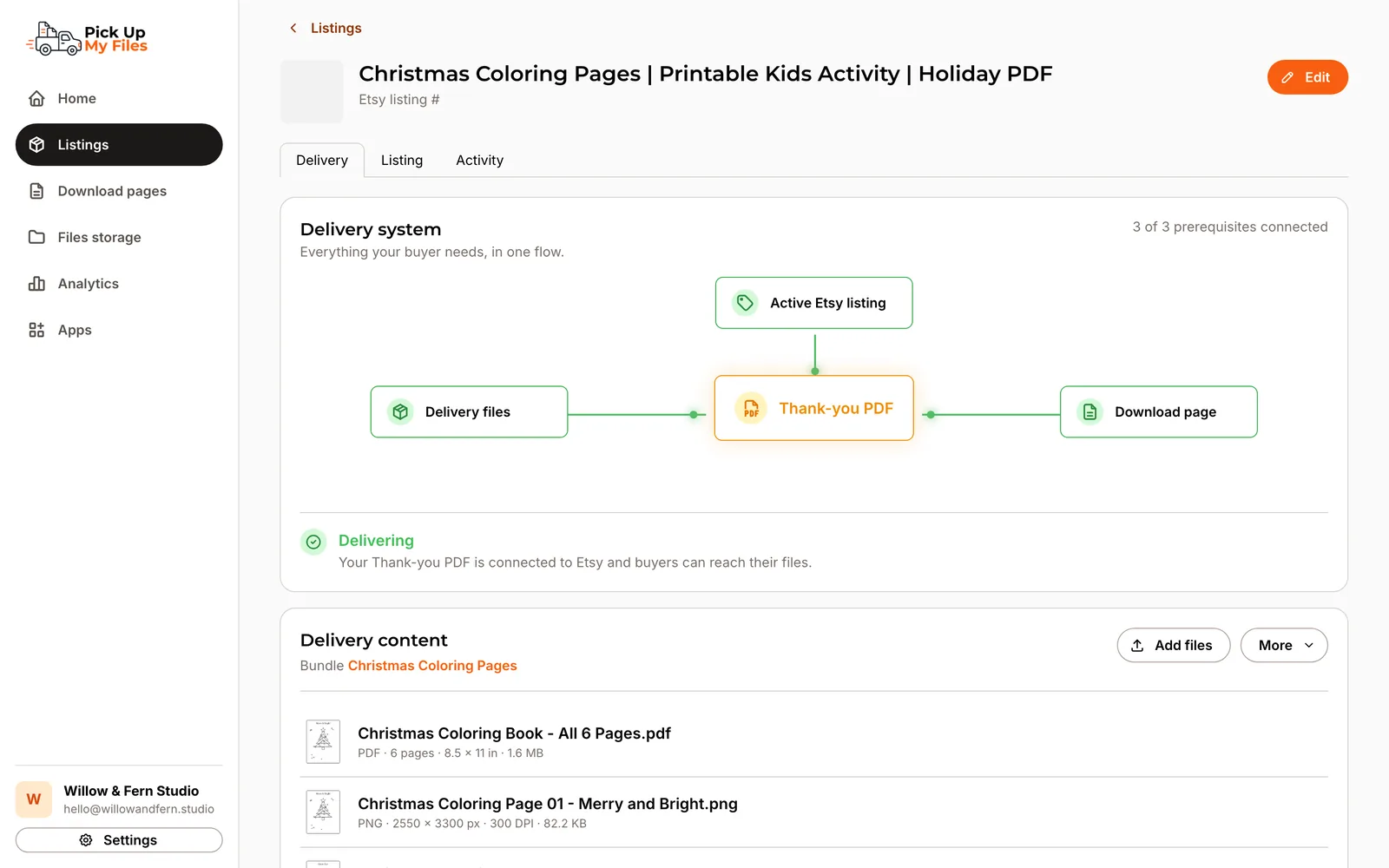
The PDF uses a clean Pick Up My Files design with one clear button. If you want it to carry your logo, colours and a few words in your own voice, the Branded Thank-you PDF (in Growth and Pro, or a single payment on Free and Starter) starts from your Brand Kit, so you change only what you want.
What the buyer sees
The buyer downloads the PDF from Etsy, opens it and taps the button. Their download page opens with your logo at the top, in your colours, and they don’t sign in.
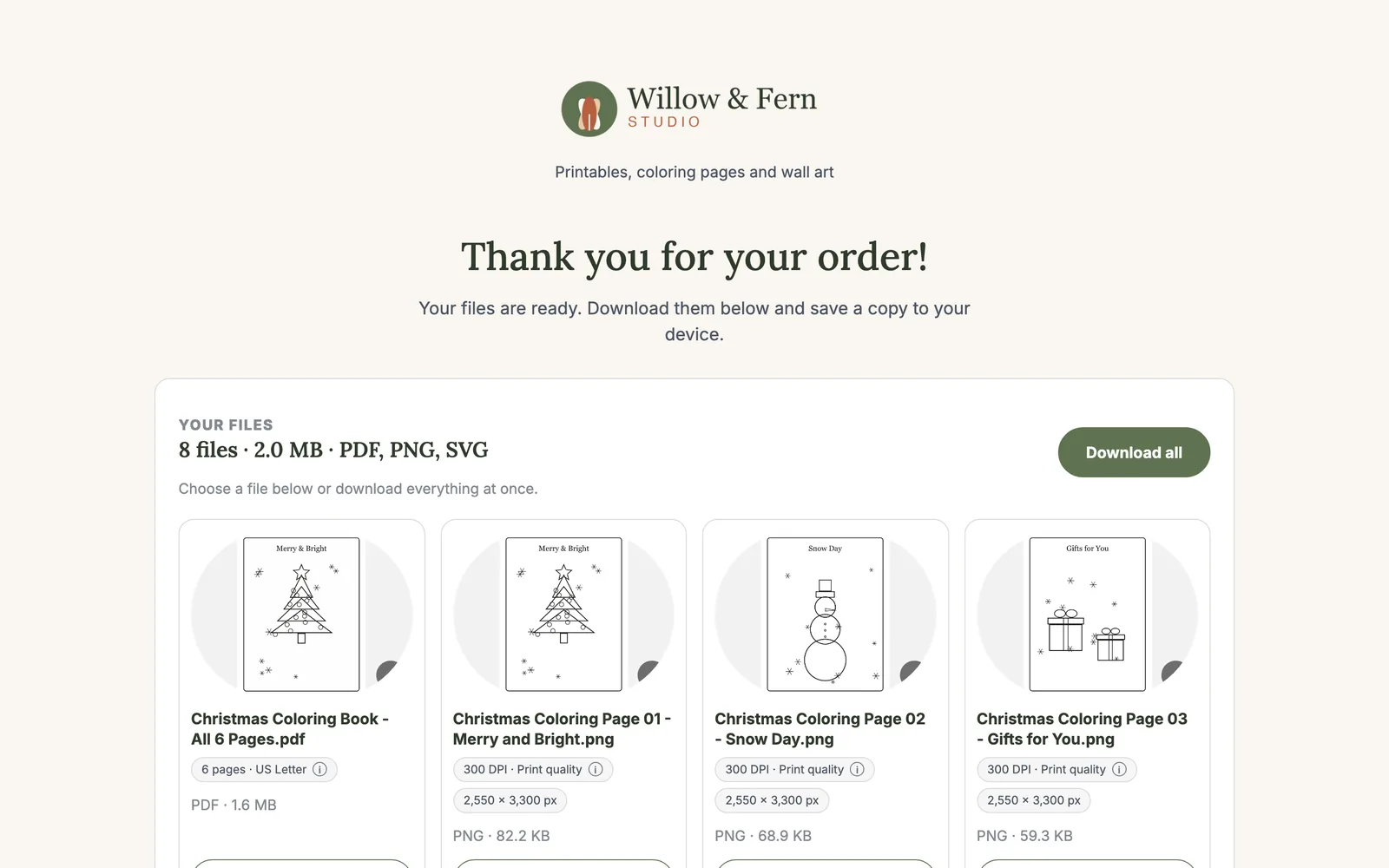
Download all comes first, with the file count and total size. Each file says what it is and how big it is, with short help tags for things like transparent backgrounds or ZIP files. They can open any preview full screen, flip through a PDF’s first pages or look inside a ZIP before downloading. The layout adapts to the number of files, from one big card to searchable shelves for a large bundle, and works on a phone as well as a computer.
Under the files they find your product guide and your Q&A. Help with downloading itself is built in: small info buttons explain things like Download all, and every page links to a help page that follows your page’s own layout. Buyers can sort out a download without writing to you first, so your inbox hears from them about the product, not the ZIP.
When something changes
The link in the PDF never changes. Fix a file, add a size or rewrite a step, and buyers who bought months ago open the same link and see your latest version. You don’t remake the PDF or touch the Etsy listing. Change your logo or colours in the Brand Kit, and every page follows.
That’s the part a PDF on its own can’t do. The PDF is a copy in the buyer’s downloads. The page it opens is yours, and it keeps up with your shop.
Etsy rules for what buyers see after the sale
Whatever you send buyers after a purchase, a few Etsy rules apply:
- No rewards for reviews. Etsy doesn’t allow sellers to offer incentives for reviews.[3] Buyers can review a digital item once they’ve downloaded it,[2] so a plain invitation with no reward is fine. The Reviews block on a download page shows your public Etsy reviews, and the review button opens the buyer’s Etsy Purchases page.
- Nothing that sends buyers off Etsy to buy. Etsy’s off-platform transactions policy prohibits off-Etsy discounts and using a QR code to direct members off Etsy.[4] Product recommendations on a download page open your Etsy listings, so the next sale happens on Etsy too.
- No adding buyers to a list without asking. Etsy says sellers may not add customers’ emails to a mailing list without their consent, and should never copy addresses from Etsy orders.[5]
If you’re not using it yet
Most shops today build their thank-you PDF by hand in a design app, one for every listing, with a button that opens a shared cloud folder. It gets the files across, but it falls short in the same places. Each PDF is rebuilt for every new listing and every time a link changes. The folder looks like everyone else’s, with no brand and no help. A buyer who downloaded last year keeps the old link, so a fixed file never reaches them. And nothing on a folder brings a buyer back to your shop.
If a buyer is stuck with a link like that today, our guide to fixing an Etsy digital download link that isn’t working goes through each symptom. Pick Up My Files replaces that whole routine with one page template and a PDF we attach for you.
Whichever way you deliver, set Etsy’s Message to Buyers for Digital Items, which shows on the Downloads page.[6] Our examples for that message include a short one that points buyers to the PDF.
Frequently asked questions
Do I need a thank-you PDF if my files fit on Etsy?
Not to deliver them, but five loose files come with no steps, no help and nothing from your shop. With Pick Up My Files, every connected listing gets the PDF anyway, so the buyer reaches your page.
Can I write my own words in the PDF?
Yes, with the Branded Thank-you PDF: a short heading, a second line, a message and the button label, with a live preview and a sample PDF to check before you save.
Try it on your own listings
You can start with Pick Up My Files for free, with the thank-you PDF made and attached for each one. See how it works.
Sources
Etsy details checked on November 18, 2026.
[1] Etsy Help: How to Manage Your Digital Listings
[2] Etsy Help: How to Download a Digital Item
[3] Etsy Seller Policy (the page blocks automated reading; the review-incentive rule was confirmed through search extracts of Etsy’s policy and Seller Handbook)
[4] Etsy Off-Platform Transactions Policy (the page blocks automated reading; wording confirmed through search extracts)
[5] Etsy Community: We’re making a few updates to protect users’ privacy
[6] Etsy Help: How to Add or Edit Your Post-Purchase Message to Buyers