
How to Send an Updated Digital File to Etsy Buyers

To send an updated digital file to Etsy buyers who already bought, you need a delivery link whose contents you can change, because replacing the file on the listing only reaches future buyers. With Pick Up My Files, the thank-you PDF on your listing opens a download page instead of a file. You replace the file once, and every buyer, from last week or last year, gets the new version through the link they already have.
Without a link like that, the fallback is Etsy Messages: one note per buyer, with the corrected file attached. That works for a handful of orders. It doesn’t work for a few hundred, and it has to be repeated for every fix.
Why past buyers miss your fixes
Etsy’s Help Center describes no update notice for digital listings.[1] Sellers in the Etsy Community report that past buyers keep the files that were attached when they bought,[7] so a buyer who downloaded your worksheet pack in March has no reason to look again in June, and nothing would be different if they did.
The tools Etsy gives you for buyer communication don’t fill the gap either. The Message to Buyers for Digital Items shows on the Downloads page and applies to every digital listing in your shop at once,[2] so it can’t carry a note about one product. Messages can carry a file, but only up to three attachments in JPG, GIF, PDF or PNG format.[3] A ZIP, an SVG bundle or a Procreate file can’t be attached at all.
It’s worth getting right. A teacher who prints 30 copies of a worksheet with the wrong answer key will remember the shop, not the typo. A buyer who gets the corrected file without asking learns that your shop stands behind what it sells, and that’s the kind of shop people come back to on Etsy.
Not every change needs the same care:
| Type of change | Example | Do past buyers need it? |
|---|---|---|
| A correction | A wrong answer, a broken link, a typo on a printable | Yes. They paid for a product that works. |
| An improvement | Five extra worksheets, a cleaner layout | Your call. It’s a kind gesture. |
| A new edition | The 2027 version of a dated planner | Usually a new product, not an update. |
How to update a file for every buyer with Pick Up My Files
Here’s how an update works once your listings deliver through Pick Up My Files. The setup happens once: you connect your Etsy shop, upload the files buyers receive, build a download page, and choose the listings that use it. We make each connected listing’s thank-you PDF and attach it on Etsy for you, on every plan. That PDF is the last file you’ll ever need on the listing, because the link inside it never changes.
From then on, an update is one change.
1. Replace the file once
Your files live in one place and are grouped into Bundles, which are the sets of files your listings deliver. To fix the answer key, replace that file in its Bundle. If you need to add a new size or five extra worksheets, add them to the Bundle.
One file can sit in as many Bundles as you need without being copied. So if the same answer key is in a single pack, a themed set and a mega bundle, you fix it once and all three deliver the corrected version. With Drive folders, that would be three fixes, and one is easy to forget.
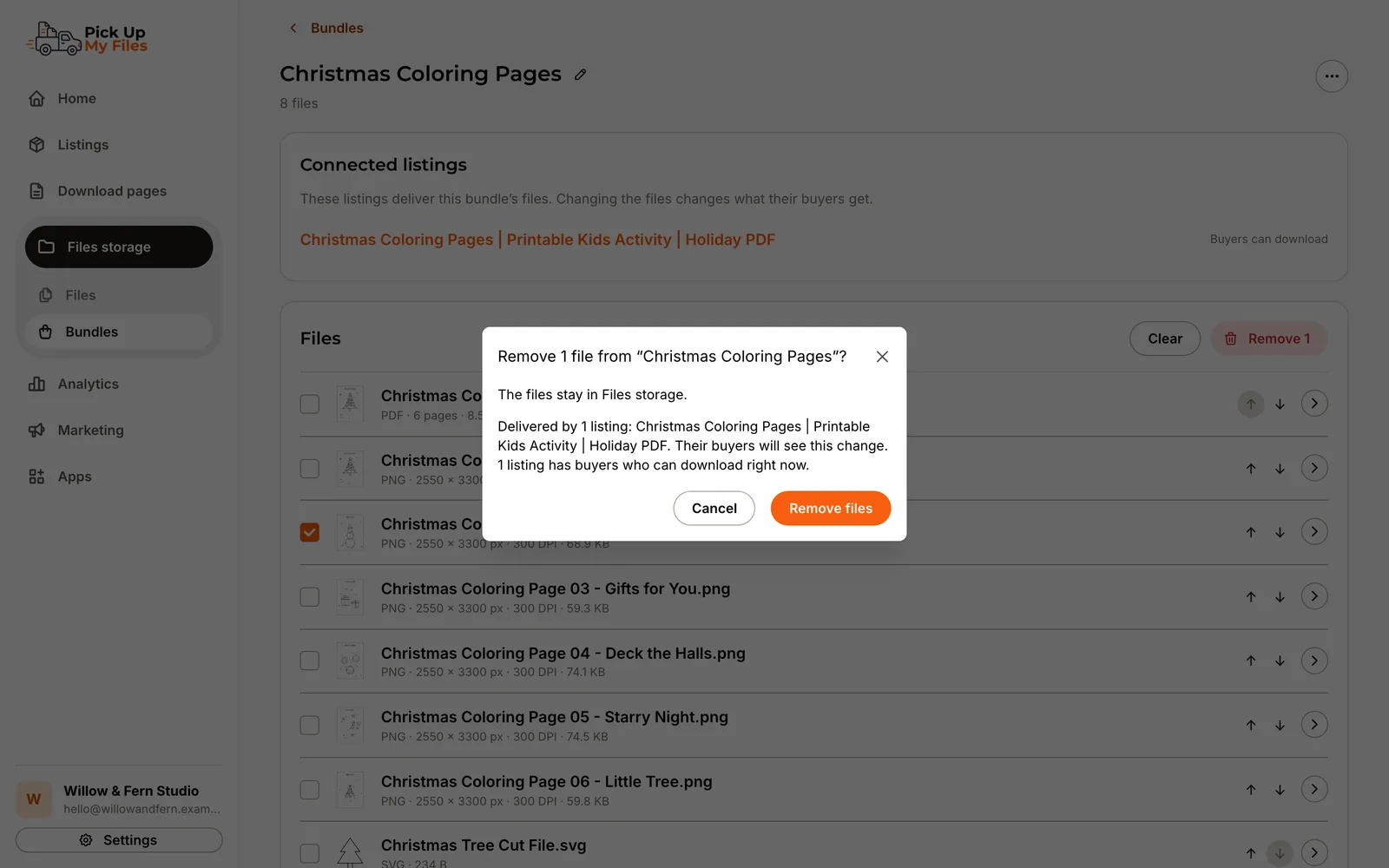
Before the change is saved, Pick Up My Files tells you which listings deliver that Bundle and that their buyers will see the change. You know exactly who the fix reaches before it reaches them.
2. Fix the page or the guide if they need it too
Sometimes the file isn’t the only thing that’s wrong. The printing steps mention the wrong paper size, or a new file needs a line of explanation. Your how-to steps live in a product guide, written once under Listings and shown on the download page of every listing it’s attached to. Edit the guide, and every page that shows it has the new version.
The same goes for the page itself. You can move a block, add a short Text block that says what changed (“Version 2, March 2027: corrected the page 12 answer key”), or rewrite the instructions. Buyers who open the page see the note right beside the files, so the improvement is noticed and not just delivered.
3. Preview, then publish
Your edits save as you go into a working draft. Buyers keep seeing the published page until you choose to publish, so a half-finished change never reaches anyone. Preview the page as a buyer will see it, check the files and the note, then make it live in one step.

When you publish, every listing connected to that page shows the new version through its existing link. There’s no new PDF to make and nothing to change on Etsy.
What the buyer sees
A buyer who bought last month, or last year, opens the thank-you PDF they already have. It takes them to the same download page, which now shows the current files with their previews and Download all first. They don’t sign in, and they don’t have to work out which of two PDFs is the new one, because the old file isn’t there anymore.
If you change your logo, colours or fonts in your Brand Kit, that travels the same way. Your pages pick up the change without you opening each one.
Tell buyers when it matters
For an improvement, you can let buyers find it the next time they open their link. For a correction, it’s kind to tell them. Because the fix is already on their page, the message doesn’t need an attachment, so ZIPs and SVG bundles are no longer a problem. Open the order in Etsy, select Message, and write something like:
Hi Sam, a quick note about the Phonics Word Sort Pack you bought in March. I found an error in the answer key on page 12. I’ve fixed it, so if you open the link in your thank-you PDF again, the corrected file is waiting for you. Nothing else in the pack changed. Thank you for your order.
Etsy asks sellers to keep buyer communication inside Messages,[3] and its Seller Policy prohibits using Messages for “unsolicited advertising or promotions.”[5] A note about a fix to something the buyer already paid for is about their existing order, which is what Messages are for.[6] Keep it to buyers of the listing you changed, send it once, and leave out coupons and other products.
If you’re not using Pick Up My Files yet
Etsy gives you two ways to handle an update on your own, and both are worth knowing.
Replace the file on the listing. In the listing editor, select Add files to upload the new one, then the X next to the old one. Add first, because Etsy won’t save an instant-download listing with no file attached. Etsy file names can’t be edited after upload and are limited to 70 characters of letters, numbers, periods, underscores and hyphens,[1] so put the version in the name. This fixes the product for future buyers only.
Message past buyers. There’s no list of buyers per listing, so search your completed orders in Shop Manager, or go to Settings, then Options, then Download Data and download the Orders CSV, which includes each order’s item title.[4] Then open each order, select Message and attach the file, within the three-attachment and file-type limits above.[3]
Many shops also use the usual workaround: a thank-you PDF made by hand for each listing, linking to a shared Drive folder whose files they swap. It falls short in familiar ways. Every new listing and every moved folder means rebuilding PDFs, and the buyer lands in a folder that looks like everyone else’s. Nobody is told the file changed, so past buyers still need a message. And nothing on that folder brings them back to your shop. If buyers already report that their link won’t open, Etsy digital download link not working covers the common causes, and changing the Etsy digital download PDF link on 100 listings covers moving a catalog to a link that stays put.
Questions sellers ask
Do I need to replace the thank-you PDF when a file changes? No. The PDF opens the download page, and the page shows whatever the Bundle holds now. You replace the file in Pick Up My Files, not on Etsy.
What about next year’s edition of a dated product? That’s usually a new listing rather than an update. You can sell it as a new product and show it to past buyers on their download page. How to upload a digital planner to Etsy covers that choice.
Can I check the update before buyers see it? Yes. Edits stay in a private draft until you publish, and the buyer preview shows exactly what buyers will get.
Make your next fix the last one you send by hand
Connect a few listings, replace a file, and open the link the way a past buyer would. Try it free.
Sources
Etsy details checked on November 18, 2026.
[1] Etsy Help: How to Manage Your Digital Listings
[2] Etsy Help: How to Add or Edit Your Post-Purchase Message to Buyers
[3] Etsy Help: How to Send Messages to Buyers
[4] Etsy Help: How to Download a Spreadsheet of Your Sold Transactions
[5] Etsy Seller Policy (the page blocks automated reading; the Messages wording is as quoted from Etsy in Value Added Resource’s November 2026 report)
[6] Etsy Help: What are Etsy’s Customer Service Standards?
[7] Etsy Community: Are past buyers notified when a digital download they purchased is updated? (seller reports; the forum requires sign-in to read replies)