How to Upload a Digital Planner to Etsy and Deliver It

To upload a digital planner to Etsy, create a listing, choose Digital files as the item type, and attach the file buyers receive. With Pick Up My Files, that file is a thank-you PDF we make and attach for you, and it opens a branded download page with every version of your planner, your GoodNotes and Notability steps right beside the files, and more of your planners below. Buyers can start using the planner without writing to you, and the page is still there when next year’s edition comes out.
Uploading is the easy half. A planner only earns its keep once the buyer has it open in their app with the tabs working, and that first hour is where most planner questions come from. A buyer who gets started on their own uses the planner all year, and when it’s time to plan the next one, they already know your layout and your shop.
What makes planners hard to deliver on Etsy
Etsy’s rules for digital listings shape everything else:[1]
- Five files, 20 MB each. A hyperlinked planner with a year of daily pages and full-colour artwork can run past 20 MB as a single PDF. A ZIP won’t fix that, because a PDF is already compressed.
- No variations, so “Dated” and “Undated” can’t be a dropdown. Every buyer gets every file.
- File names are permanent: up to 70 characters of letters, numbers, periods, underscores and hyphens, with no editing after upload.
Planners often come in several versions: dated and undated, Monday or Sunday start, portrait or landscape, light or dark. Four choices with two options each make 16 combinations, for a listing that holds five files.
Shrinking the file has its own risk. Goodnotes notes that a flattened PDF loses its original links and outlines,[2] and a planner without working tabs is a support message waiting to happen.
Then there’s the download itself. Etsy says buyers “can’t download a digital purchase through the Etsy app at this time”,[4] so buyers need to open their purchase in a browser. And once a buyer has the file, it’s theirs as it was: Etsy doesn’t notify past buyers of changes, and seller reports say they keep the files from the time of purchase,[9] so a tab that jumps to the wrong month stays broken for everyone who already bought.
How to deliver a digital planner with Pick Up My Files
Here’s the setup, in the order it runs. You connect your Etsy shop once, and your planner listings come across with their titles, photos and prices. The rest is building one page that every planner listing can use.
1. Upload every version and group it into a Bundle
Upload all the versions your planner comes in. Upload a folder and we offer to turn it into a Bundle, which is a named set of files a listing delivers. A Bundle holds as many files as the product needs, so all 16 combinations can go to one listing if you sell them, and a 40 MB planner doesn’t have to be split in half to fit. One listing can also deliver more than one Bundle, for example a dated set and an undated set.
Arrange the files in the order that makes sense to a buyer, or sort them by name. If an undated version is shared between your 2027 planner and a mega bundle, it lives once and sits in both Bundles.
2. Write your GoodNotes and Notability steps once
Under Listings, start a product guide from the ready-made guide for digital planners, then make it your own. A guide holds a one-line summary, what buyers will need, numbered steps with an optional image, and short tips. Attach it to every planner listing it fits, and update it in one place.
These steps, from each app’s own help, are a good base.
Downloading on an iPad. The buyer signs in at Etsy.com in Safari, goes to Purchases, and selects Download Files next to the order.[4] Guest buyers use the link in their receipt email.[4] The thank-you PDF takes them to your page, where they download the version they want.
Importing into GoodNotes:[3]
- In Goodnotes, open the Documents tab of the library.
- Tap + New, then Import.
- Select the planner PDF and tap Open.
Or, from the Files app on iPad, open the PDF, tap Share, and choose Open in Goodnotes, then pick the New Document tab and confirm.[3] On iPad and iPhone, buyers tap a linked tab to follow it. On Android, Windows and the web, they enter Read Only Mode first, or press and hold a link and choose Open Link in Edit Mode.[5]
Importing into Notability, from Ginger Labs’ instructions for iPad and iPhone:[6]
- In the Notability library, press and hold + New.
- Choose Import.
- Pick the source, such as Files, and select the planner.
Ginger Labs’ help doesn’t describe how links inside an imported planner behave, so test your tabs in Notability before your guide says they work there.
The Guide block shows the right guide for each listing, on the page or collapsed under the summary, on every plan. From Starter, a guide can also open on its own branded guide page, with steps buyers can tick off and a PDF they can save. Your guide never has to explain downloading, because each page has built-in help for that.
3. Answer the usual questions on the page
Add a Q&A block for the things planner buyers ask most: which app to use, how the tabs and links work, and why a tab doesn’t jump in Edit Mode on Android. Goodnotes’ own first check is worth including: if a link fails in another PDF viewer too, the PDF probably doesn’t contain a working link.[7] Answers that open in place save both of you a message.
4. Build the page and connect your planner listings
Your download page is a template. It reads the listing each buyer arrived from and shows that product’s files, previews and guide, so one page can serve every planner you sell. Your Brand Kit puts your logo, colours, fonts and button style on it.
Connect each planner listing to the page and its Bundle. We generate the listing’s thank-you PDF and attach it on Etsy for you.
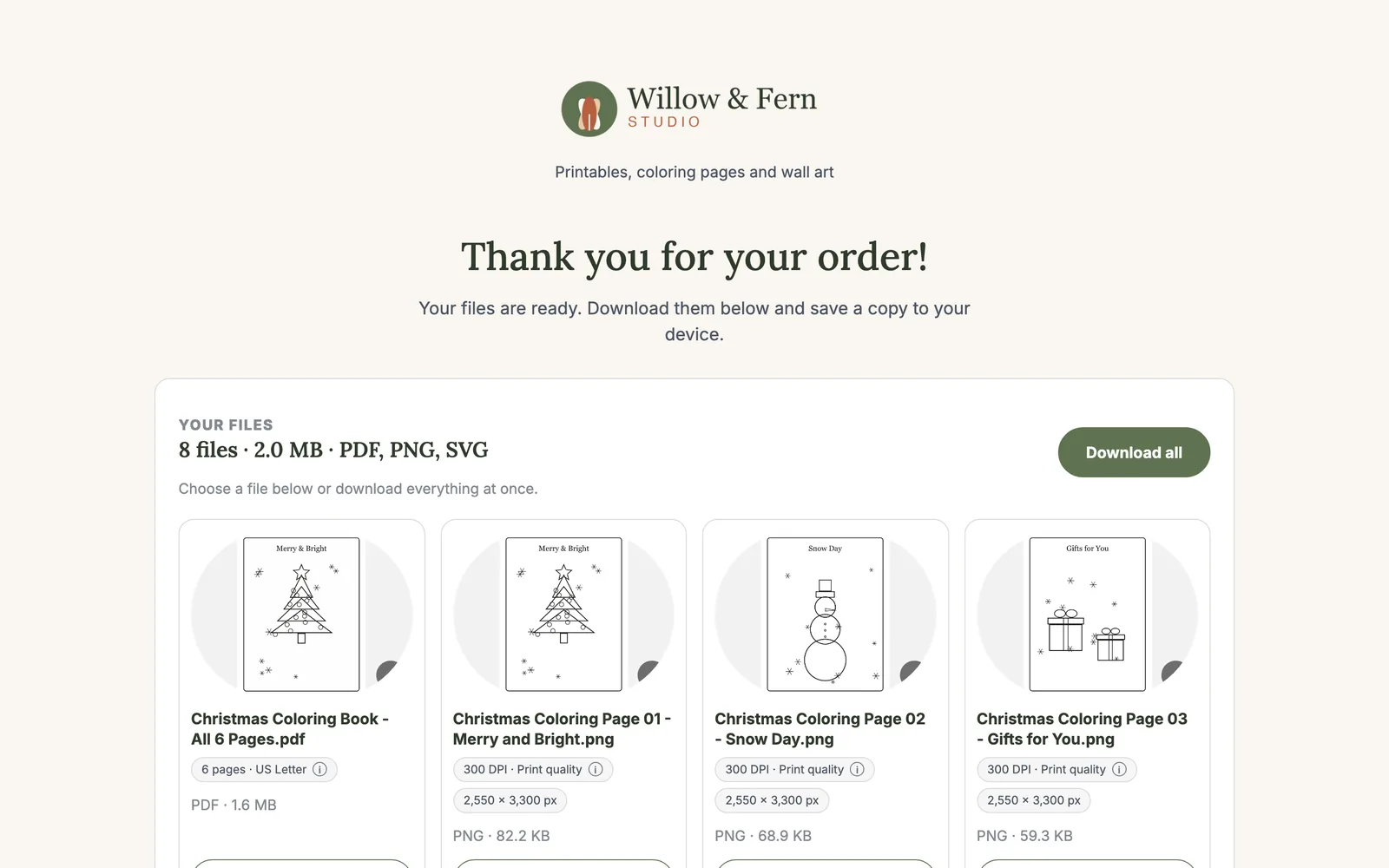
Here’s what the buyer sees. Download all comes first, with the file count and total size. Each version shows its size and a preview, and buyers can flip through a PDF’s first pages before they download, so “Monday start, landscape” is easy to tell from “Sunday start, portrait”. Your steps for their app sit just below. The page works on a phone, a tablet or a computer, and buyers don’t sign in.
5. Show buyers more of your planners
On Growth and Pro, add a Product recommendations block. It reads the listing the buyer came from and picks related products from your catalog, such as inserts, stickers or a matching undated planner. Every recommendation opens its Etsy listing, so the next purchase happens on Etsy, the way the first one did.
6. Invite buyers to hear about next year’s edition
A dated planner has a natural next purchase built in. On Growth and Pro, turn on Marketing, add your shop name and privacy contact, and create a group such as “2028 planner”. Then add the Email capture block to the page and choose that group.

The buyer decides: they type their own address and give consent, and their files never depend on it. We host a privacy notice built from your shop details. When the new edition is listed, download that group as a CSV or Excel file, import it into the email tool you use, and link to the new listing on Etsy.
When something needs fixing
Say you find a tab that jumps to the wrong month. Replace the file in its Bundle once. Every listing that delivers it shows the corrected planner, and buyers who bought last month get it the next time they open the link in their thank-you PDF. There’s no new PDF to make and nothing to change on Etsy.
Next year’s edition is your call. You can add it to the Bundle as a thank-you for past buyers, or sell it as a new listing and show it to them on the page they already know.
If you’re not using Pick Up My Files yet
You can attach the planner straight to the listing if it fits in five files of 20 MB each.[1] Put the year and version in each file name, test every tab in Goodnotes and Notability with the exact file you’ll upload, and set Etsy’s Message to Buyers for Digital Items. It shows on the Downloads page and applies to every digital listing in your shop,[8] so keep it general: download at Etsy.com in a browser, then share the file to GoodNotes or Notability.
Also check the buyer’s app. On Android, Windows and the web, free Goodnotes users can import files of up to 5 MB, while subscribers can import PDFs of up to 1 GB.[3] If your planner is bigger than 5 MB, say in the listing that it’s made for iPad, or that Goodnotes on other devices needs a subscription.
When a planner outgrows five files, most shops turn to a thank-you PDF made by hand that links to a shared folder. That PDF has to be rebuilt for every listing and every moved folder, buyers land in a folder that looks like everyone else’s, and a fixed tab never reaches the people who already bought. Nothing in the folder points them to next year’s planner either. How to upload files larger than 20 MB on Etsy covers the size question in more depth.
Questions sellers ask
Do I still need a separate instructions PDF? No. Your GoodNotes and Notability steps live in the guide on the page, and from Starter buyers can save them as a PDF.
Can buyers download in the Etsy app? No. Etsy’s app doesn’t download digital purchases,[4] so buyers open their purchase in a browser. The thank-you PDF opens there, and the download page works on an iPad.
What should I make alongside the planner? See printable planner ideas for Etsy sellers.
Give your planner a page buyers can follow
Build one page for your planners and open it the way a buyer will. Try it free.
Sources
Etsy, Goodnotes and Notability details checked on November 18, 2026.
[1] Etsy Help: How to Manage Your Digital Listings
[2] Goodnotes Support: PDF outlines and hyperlinks are missing when I export a document
[3] Goodnotes Support: Import files into Goodnotes
[4] Etsy Help: How to Download a Digital Item
[5] Goodnotes Support: Open hyperlinks in imported PDFs
[6] Notability Support: Importing Files (read through search extracts; the page blocks automated reading)
[7] Goodnotes Support: Open Hyperlinks in an Imported PDF
[8] Etsy Help: How to Add or Edit Your Post-Purchase Message to Buyers
[9] Etsy Community: Are past buyers notified when a digital download they purchased is updated? (seller reports; the forum requires sign-in to read replies)