Etsy Message to Buyers for Digital Items, With Examples

Etsy’s Message to Buyers for Digital Items is a short note that appears on the buyer’s Downloads page, right where they collect their files. One message covers every digital listing in your shop.[1] Use it to help, not to sell: thank the buyer, tell them to download in a web browser rather than the Etsy app, and say how to reach you. With Pick Up My Files it can stay that short: we attach a thank-you PDF to every listing you connect, and its button opens a download page with the files, your steps for that product and built-in help, so the message only has to point to the PDF, and it stays right when you change a product.
It’s a small field, but it’s the first thing you say to a buyer at the moment they open what they paid for. A few warm, clear sentences in your own voice make the Downloads page feel like your shop.
Two messages, two moments
Etsy gives you two post-purchase messages, and buyers see them in different places.[1][2]
| Message to Buyers | Message to Buyers for Digital Items | |
|---|---|---|
| Where buyers see it | The receipt page and the order confirmation email | The Downloads page for digital orders |
| Which orders | Every order from your shop | Every digital listing bought from your shop |
| Use it for | A thank-you and what happens next | How to get to the files |
For a digital shop the two work as a pair. The confirmation email reaches the buyer first, often on their phone, so the standard message points them to the right place. The digital message tells them what to do once they’re there.
Where to set it
Etsy’s help article gives this path for the Message to Buyers:[1]
- Sign in and open Shop Manager.
- Go to Settings, then Info & Appearance.
- Find Message to Buyers and enter your message.
- Select Save Changes.
The same article says shops that sell digital items can also add a Message to Buyers for Digital Items, but it doesn’t say exactly where the field sits.[1] Look for it in the same Info & Appearance settings. The article gives no character limit, but keep it to a short paragraph, because buyers read it on a phone on the way to their files.
Why one message is hard to get right
Because one message covers every digital listing, it can’t hold product details. A good one still has to answer four questions:
- Where are my files? Below the message, on the Downloads page.
- Why can’t I download in the app? Etsy says buyers “can’t download a digital purchase through the Etsy app at this time” and need a mobile browser or a computer.[3]
- What do I do with this file? Open it, unzip it, print it or install it, which differs from product to product.
- What if it doesn’t work? Message the shop on Etsy.
The third question is where most messages grow too long, trying to cover printing, ZIP folders and software for every product at once.
How to do it with Pick Up My Files
Pick Up My Files moves the third question off the message and onto a page that knows which product the buyer bought.
1. Connect your Etsy shop
Authorize Pick Up My Files once from your Etsy account, and your digital listings come across without retyping.
2. Connect each listing, and we attach the PDF
Pick a page and files for a listing, and we generate its thank-you PDF and attach it on Etsy. Every connected listing now delivers the same kind of thing: one PDF with one button. Your listings show which ones have their PDF on Etsy, so you can see that the message is true for each of them.
3. Put the product steps in a guide
Under Listings, write a guide for each kind of product, from scratch or from a ready-made guide for things like printable art, digital planners, SVG cut files or fonts. Attach it to the listings it belongs to, and add the Guide block to your download page. The block follows the listing the buyer came from, so one page shows each buyer the steps for the product they bought.
That’s the per-listing message Etsy’s field can’t give you.
4. Let the page cover the download
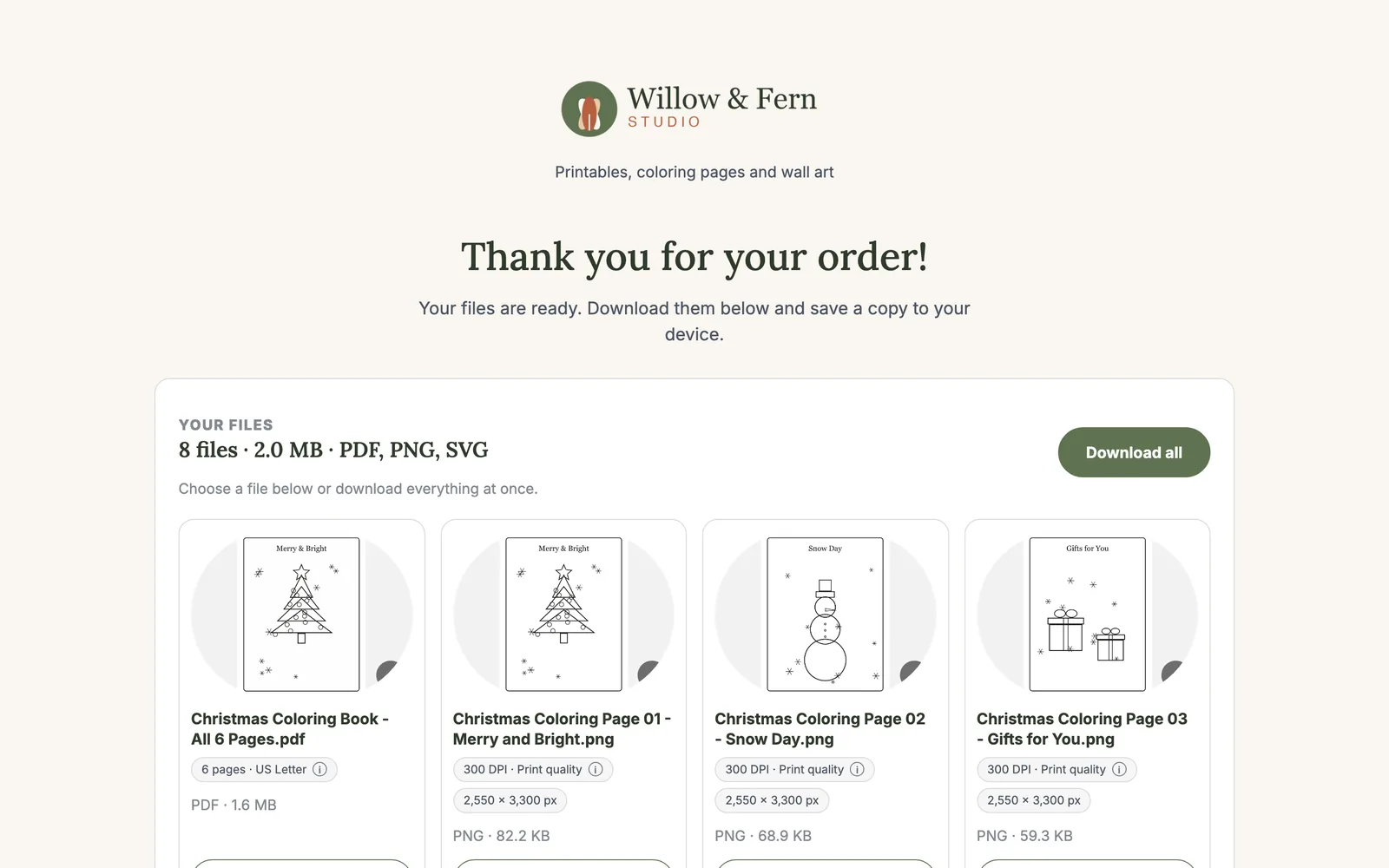
The download page shows the buyer’s files with previews and Download all first, with the file count and total size. Small info buttons explain things like Download all and ZIP files, and every page links to a help page that follows your page’s own layout. Your message never has to explain unzipping.
5. Write the short message
Thank you for your order! Please download the PDF below in a web browser (Safari or Chrome on your phone, or a computer), because the Etsy app can’t download files. Open it and tap the button to reach your download page, with all your files and how to use them. Questions? Message me here on Etsy.
That message stays correct. The link in the PDF never changes, so when you fix a file, add a size or rewrite a guide, buyers see it through the same link and the message still describes what they’ll find.
More examples you can paste
Change the words so they sound like you.
A shop where some listings still deliver files directly
If you’ve connected some listings but not all yet, cover both:
Thank you for your order! Please download your files in a web browser, because the Etsy app can’t download them. If you see a PDF below, open it and tap the button to reach your download page. Otherwise, tap each file to save it. Questions? Message me here on Etsy.
Made-to-order and personalized items
Thank you for your order! If you ordered a personalized item, I’ll upload your files when they’re ready. Etsy will email you, and they’ll appear under Purchases. Please download them in a web browser, because the Etsy app can’t download files. If you haven’t sent your personalization details yet, please message me here on Etsy.
Etsy emails the buyer when made-to-order files are ready.[3] Check any timing you mention against your own processing time.
The standard Message to Buyers for a digital shop
This one goes in the general Message to Buyers, which shows on the receipt and in the confirmation email:[1]
Thank you for your order! Your digital files are ready under Purchases on Etsy.com. Please open Etsy in a web browser to download them, because the Etsy app can’t download digital files. If you checked out as a guest, use the download link in your Etsy receipt email.
The last line matters, because Etsy says guest buyers find their download link in the receipt email.[3]
Keep it to service
Etsy frames the standard message as a place to thank shoppers and share what they need,[1] and its seller announcement on privacy suggests customizing your Message to Buyers “to thank shoppers for their orders.”[4] These lines turn up in templates and don’t belong:
- “Leave a 5-star review and get 20% off your next order.” Etsy’s seller policy doesn’t allow review incentives,[5] so no discount, freebie or bonus file for a review, and no request for a particular rating.
- “Get 15% off when you buy on my website.” Etsy’s off-platform transactions policy prohibits encouraging purchases outside Etsy, including off-Etsy discounts, and QR codes that direct members off Etsy.[6]
- “You’ve been added to my newsletter.” Etsy says you may not add customers’ emails to a mailing list without their consent, and should never copy addresses from orders.[4]
Your shop story and other products belong somewhere with room for them. On a download page, a Reviews block can show your public Etsy reviews, and on Growth and Pro, product recommendations show your other listings, each opening on Etsy.
If you’re not using it yet
Most shops today attach a thank-you PDF they built by hand for each listing, linking to a shared folder, and then try to make one shop-wide message explain every product. The message grows long, and it goes out of date whenever a link or a delivery method changes. A buyer who downloaded last month still has the old PDF and the old link, and the folder it opens has no steps, no help and nothing from your shop. If a buyer reports a broken link, our guide to fixing an Etsy digital download link that isn’t working covers each symptom.
If your files are attached directly to the listings, a plain version works well: thank the buyer, say “browser, not the app”, tell them to tap each file to save it, and how to reach you.
Frequently asked questions
Does the digital message appear in the order email?
Etsy says it’s included on the Downloads page for digital orders.[1] The standard Message to Buyers is the one in the order confirmation email.
Can I write a different message for each listing?
Not with this field. Etsy applies one Message to Buyers for Digital Items to all digital listings bought from your shop.[1] With Pick Up My Files, the Guide block on the download page gives each listing its own steps instead.
Should I mention the Etsy app?
Yes. It’s a common reason buyers can’t find their files, and why buyers can’t download digital files on the Etsy app has the full steps.
Try it on your own listings
You can start with Pick Up My Files for free, with a thank-you PDF attached to each, so one short message works for all of them. See how it works.
Sources
Etsy details checked on November 18, 2026.
[1] Etsy Help: How to Add or Edit Your Post-Purchase Message to Buyers
[2] Etsy Help: How to Manage Your Digital Listings
[3] Etsy Help: How to Download a Digital Item
[4] Etsy Community: We’re making a few updates to protect users’ privacy
[5] Etsy Seller Policy (the page blocks automated reading; the review-incentive rule was confirmed through search extracts of Etsy’s policy and Seller Handbook)
[6] Etsy Off-Platform Transactions Policy (the page blocks automated reading; wording confirmed through search extracts)