How to Sell More Than 5 Files on Etsy in One Listing
An Etsy digital listing holds up to five files of 20 MB each, and digital items can’t have variations.[1] To sell more than 5 files on Etsy in one listing, you can pack them into ZIPs, which count as one file each. Or you can upload the set to Pick Up My Files, group it into a Bundle and connect the listing: the buyer opens one branded download page that shows every file with a preview and Download all, however many files there are.
For many shops, fitting the files is the easy part. The harder part comes after the sale, when a buyer opens 60 files on a phone and has to work out where to start.
What five files means in practice
Etsy’s rules for instant-download listings, checked on Etsy Help on 2026-11-18:[1]
- Up to five files per listing, each up to 20 MB.
- No variations for digital items. You can’t offer “PNG only” and “PNG plus SVG” as options on one listing.
- File names are fixed. Buyers see your file names exactly as uploaded, you can’t rename a file afterwards, and names can use up to 70 letters, numbers, periods, underscores or hyphens.
Put together, a listing is one fixed package of up to five files, the same for every buyer. Five ZIPs of 20 MB each can carry up to 100 MB, which is plenty for printables, worksheets and many image sets. But a ZIP hides its contents until it’s opened, zipping images and PDFs barely shrinks them,[5] and Etsy notes that buyers on phones and tablets may need a file manager or another app to unzip a download.[2]
Sets also tend to be sold more than once: a single design, a themed set and a mega bundle that holds them all. On Etsy alone, each of those is its own listing with its own copies of the files.
How to deliver a big set with Pick Up My Files
Pick Up My Files keeps the sale on Etsy and gives the set a page of its own. Etsy delivers the thank-you PDF we attach to the listing, and that PDF opens your download page, where the buyer finds every file. Here is the setup, in the order the app works.
1. Connect your Etsy shop
Connect your shop and import your digital listings in a few clicks. Your products come across without retyping.
2. Upload the set once
Drop in single files, several at once, a whole folder or the ZIP you already send. Each file is checked for viruses, stored privately and given a preview. If you upload a file you already have, it’s kept once instead of twice.
A ZIP stays one file, the way you made it, and buyers can look inside it before they download. If you’d rather deliver the pieces separately, unpack it with one click and keep its files together as a Bundle.
3. Group the files into a Bundle
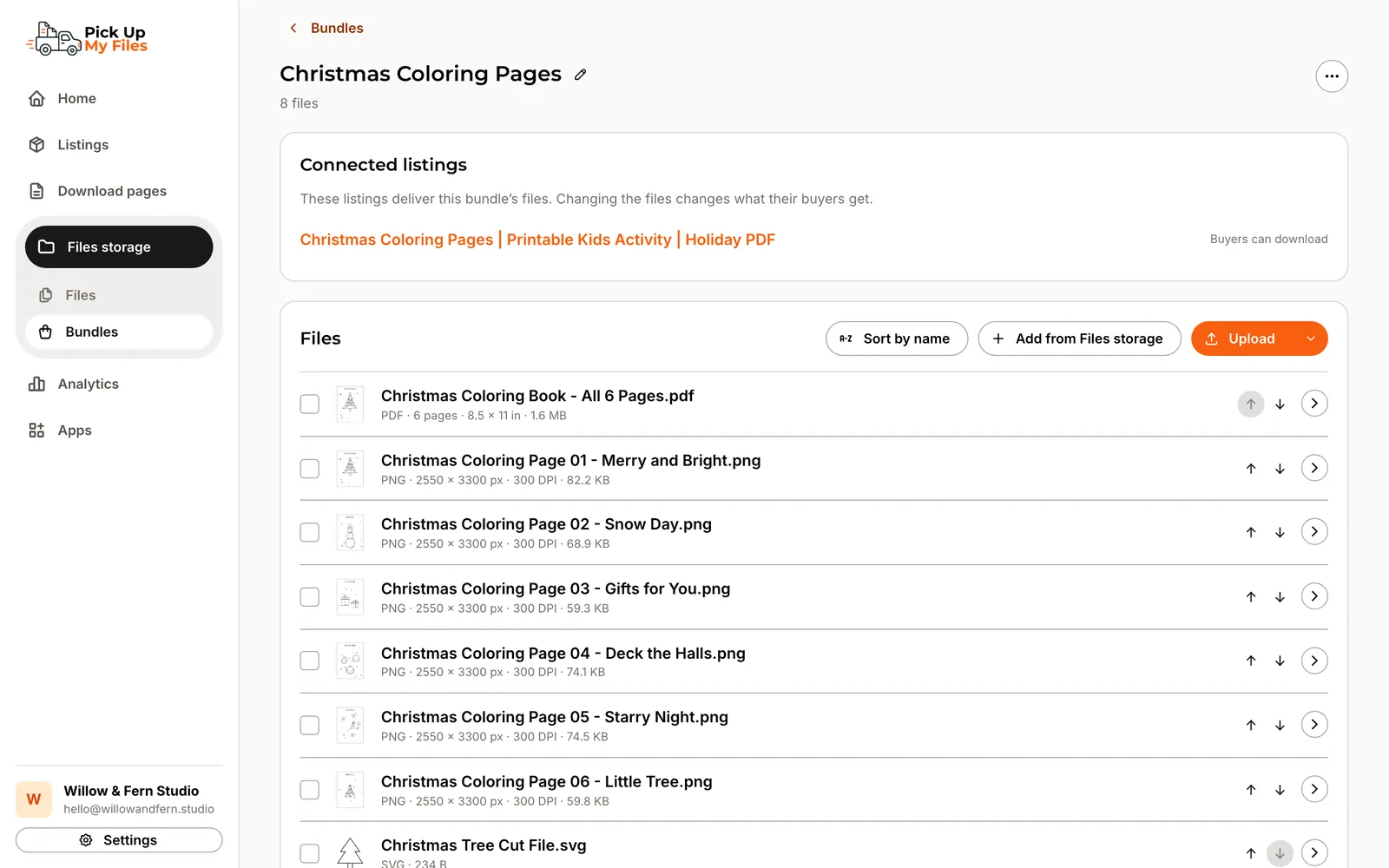
A Bundle is a set of files with a name. It appears as you work: add a second file to a listing and it becomes a Bundle automatically, named after the listing. Upload a folder and we offer to turn it into one. You can also select files and choose Create bundle, or start an empty Bundle and fill it later.
Arrange the files by hand or sort them by name. That’s the order buyers see.
4. Reuse files across listings
Bundles work like tags, not folders. A file lives once in your account and can belong to as many Bundles as you need, so a single design, a themed set and a mega bundle can share the same files without duplicates. Connect each Bundle to every listing that should deliver it. Each Bundle shows how many listings it’s connected to, and each file shows the Bundles and listings it’s part of.
A listing can also deliver more than one Bundle, such as a PNG set and an SVG set side by side. When it does, buyers see the Bundle names, so name them for the buyer.
5. Build your page once and connect the listing
Your effort goes into one download page, which works as a template for your listings. It starts with the delivery essentials in place, and your Brand Kit, with your logo, colors, fonts and button style, is applied to it. The page reads the listing each buyer arrived from and shows that product’s files, so one page can serve your whole catalog. Pick the Bundle on each listing that should deliver it.
6. We attach the thank-you PDF on Etsy
We make the thank-you PDF for each listing you connect and attach it on Etsy, on every plan. You don’t make it or upload it.
What the buyer sees
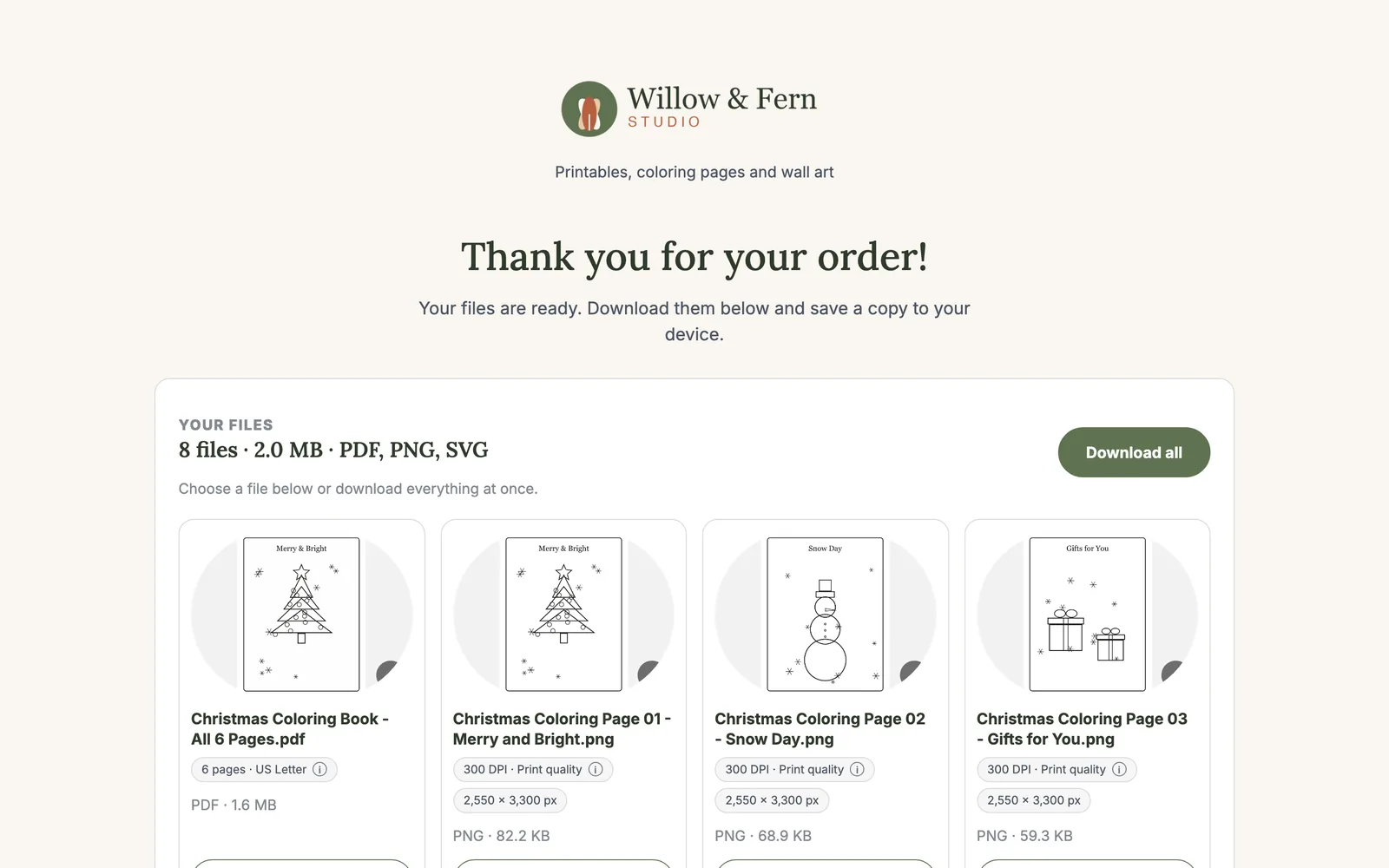
The buyer taps the button in the PDF and opens your page, with no sign-in. They never have to unpack anything. Download all comes first, with the file count and total size, so they can take the whole set in one tap. Below it, the Bundle’s files appear one by one, in the order you set, each with what it is and how big it is.
The layout adapts to the number of files, from one big card to searchable shelves for large bundles, with search and Select when a buyer wants only some of them. They can open any preview full screen, on a phone as well as on a computer. Small info buttons explain things like Download all, and every page links to a help page, so a buyer with 120 designs can find their way without writing to you first.
When you add or fix a file
Change a Bundle anywhere and it changes everywhere. Before you add, remove or delete files, we tell you which listings deliver that Bundle and that their buyers will see the change. If the Bundle is shared and you add files from one listing, you choose whether the change is for every listing or only that one.
Buyers who bought months ago open the same link in their PDF and see the updated set. You don’t remake the PDF or touch the Etsy listing.
Buyers can see your other sets
On Growth and Pro, a product recommendations block can show more of your Etsy listings further down the page, such as your other themed sets, picked to match what the buyer bought. Each one opens the listing on Etsy, where they buy the way they did the first time.
If you’re not using it yet: ZIPs and separate listings
Without a download page, two Etsy-native routes cover most sets.
Pack the set into ZIPs. Group files the way your buyer will use them, not the way they sit on your computer: by format (PNG in one ZIP, SVG in another), by theme, or by paper size. A buyer who only needs the PNGs then downloads only that ZIP. Keep each ZIP at 20 MB or less,[1] and name it so its contents are obvious, such as Spring-Florals-PNG-Part-1-of-2.zip. The guide to ZIP files for Etsy covers folder structure and the unzip steps to share.
Split the set across listings. If buyers might want parts on their own, sell themed mini sets plus a listing that holds all of them. Separate listings also stand in for variations, such as a letter size and an A4 listing. Each listing costs $0.20 USD, whether or not it sells, and again whenever an auto-renewing listing sells.[3] When one file appears in a mini set and the full bundle, a fix means re-uploading it to every listing that includes it.
When five ZIPs aren’t enough, many shops fall back on a PDF built by hand for each listing, linking to a shared Google Drive folder. Anyone with that link can open the folder,[4] the PDF has to be rebuilt whenever the link changes, the buyer lands in a list of file names that looks like every other shop’s, and nothing brings them back to you. The Drive link and download page comparison shows the difference.
Whatever you choose, a few habits help a big set land well:
- List what’s included in the description: the number of files, their formats and sizes, and how they’ll arrive.
- Number the parts.
Part-1-of-3tells the buyer there’s more to download. - Number the designs in your preview image and use the same numbers in the file names.
- Explain the Etsy app. Buyers can’t download digital purchases in the Etsy app. They need a browser at Etsy.com, then Purchases and Download Files.[2] Say that in the listing and in your note for buyers, which Etsy shows on the Downloads page.[1] The overview of how Etsy digital downloads work covers the rest of the buyer’s path.
Questions sellers ask
Can I add more than five files to an Etsy digital listing?
Not on Etsy itself. The limit is five files per digital listing, each up to 20 MB.[1] To deliver more, use ZIPs, split the set across listings, or connect the listing to a Bundle on a download page.
Does a ZIP count as one file on Etsy?
Yes. A ZIP uses one of your five file slots, and the ZIP itself must be 20 MB or less.[1]
Can I offer different file options with variations?
Not on a digital listing. Etsy doesn’t support variations for digital items, so every buyer gets the same files.[1] Sellers either include every option in one listing or create a separate listing for each.
Give your biggest set a page
You can start with Pick Up My Files for free, with the thank-you PDF made and attached for you. See how Bundles deliver a whole set.
Sources
[1] Etsy: How to Manage Your Digital Listings (checked 2026-11-18)
[2] Etsy: How to Download a Digital Item (checked 2026-11-18)
[3] Etsy: Etsy Fee Basics (checked 2026-11-18)
[4] Google Drive Help: Share files from Google Drive
[5] WinZip Knowledge Base: Why don’t some files compress very much?