How to Build an Email List from Etsy Digital Downloads

To build an email list from Etsy digital downloads, invite buyers at the moment they open their files, and let each one type their own address and choose to join. With Pick Up My Files, that invitation is an Email capture block on your download page, right below the files the buyer paid for. Signups land in groups you choose, and you export them to your email tool when you’re ready to write.
Why the download page is the place to ask
Etsy’s rule on mailing lists is simple: buyers opt in. Etsy has told sellers they may not add customers to an email list without consent, and should never copy email addresses from Etsy orders into a list.[1] Etsy’s policies also prohibit unsolicited promotions in Etsy Messages,[2] so a newsletter note sent to every buyer is out too.
That leaves one way to grow a list: buyers sign up themselves. What matters is where you ask.
Digital sellers have a real advantage here. A buyer has to open your files to use what they bought, so every buyer meets your work at a moment when they’re paying attention. Someone who has just opened a coloring book they like is much more open to “want more like this?” than someone scrolling past an ad. An invitation on the page where they collect their files reaches every buyer, at that moment, within Etsy’s rules.
For the policy detail, read whether you can collect emails on Etsy.
Before you start: decide what your list is for
Write one sentence that says what subscribers get. For example:
- “New coloring pages, seasonal sets and the occasional freebie.”
- “First look at new clip art sets, plus a free sample each season.”
- “New classroom resources for grades 2 and 3, about twice a month.”
That sentence becomes the introduction on your signup form, so buyers know what they’re agreeing to. Promise only what you’ll send. A list that expects monthly emails and hears nothing for half a year forgets who you are.
A small free gift for joining, such as a bonus page or a sample set in a new style, gives buyers a reason to say yes. Keep it truly free, and send it in your welcome email.
How to build your list with Pick Up My Files
Email capture is part of the Marketing app, on the Growth and Pro plans. Here is the setup in the order you do it, and what your buyers see at each step.
Step 1: Turn on Marketing
Turn on Marketing and add your shop name and a privacy contact email. Pick Up My Files uses them to host a privacy notice for your signup form, so you don’t have to write and publish one yourself. Then create your first group.
Groups keep the list organized. One group per product line suits most shops, such as “Coloring pages”, “Planners” and “Classroom”. Later you can filter and export by group, so planner buyers hear about planners.
Step 2: Add the Email capture block to your download page
Open your download page in the editor and add the Email capture block below your files and instructions. Your download page is a template that serves every listing connected to it, so one block puts the invitation in front of buyers of all those listings.
In the block settings, choose:
- Groups. Every signup from this block joins the groups you select.
- Heading and introduction. Your one-sentence promise goes here, under a heading such as “Get new printables first”.
- Fields. Ask for an email address alone, or add first name, last name or birthday when you’ll use them.
- Button text, success message and layout, so the form fits your page.
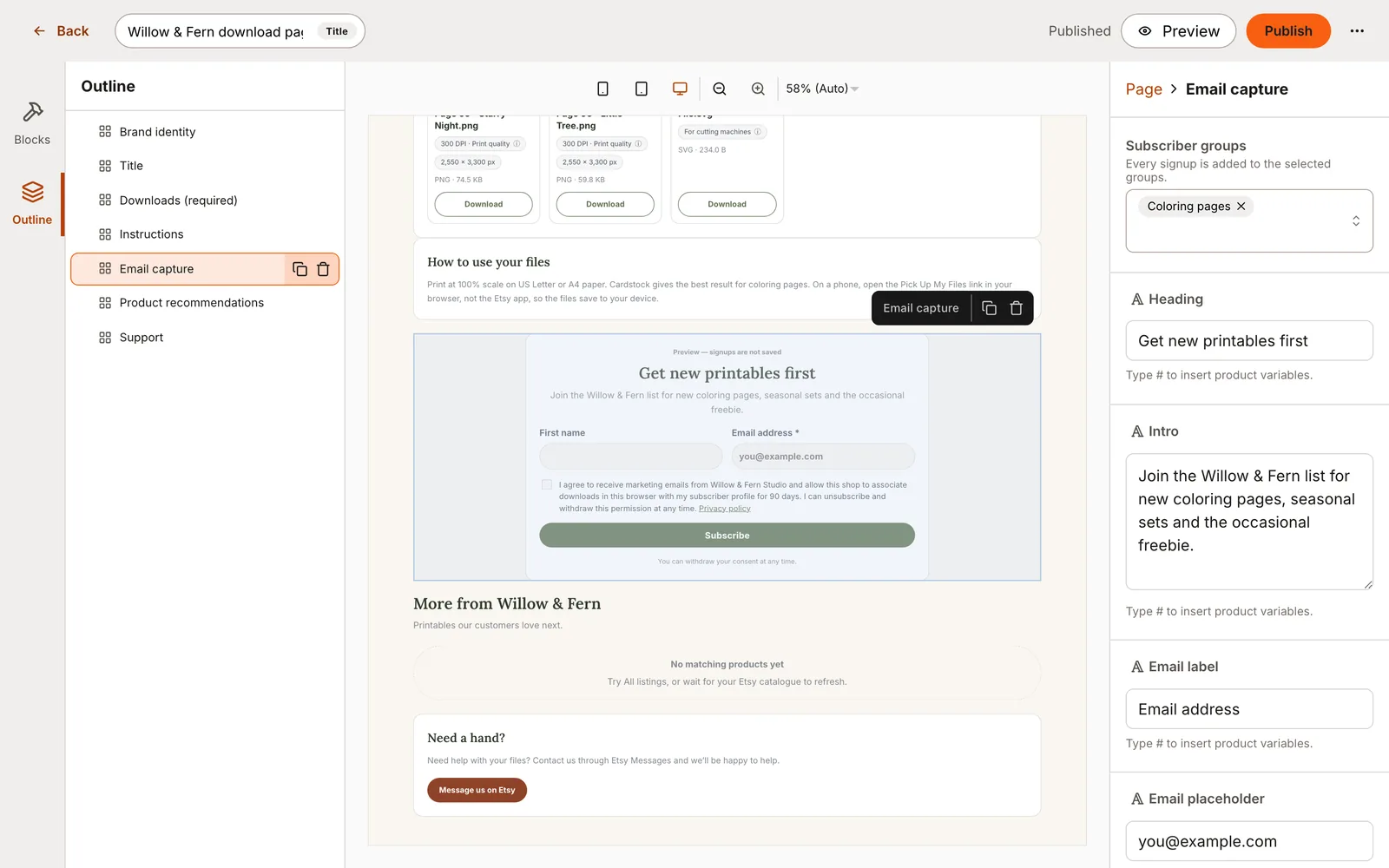
Preview the buyer view, then publish. Because the link in each thank-you PDF opens your current page, buyers who bought before you added the form see it too the next time they open their link.
Step 3: Buyers sign up where they open their files
Here is the buyer’s side. On Etsy, they download the thank-you PDF that Pick Up My Files made and attached to the listing for you, and open its link. Your download page shows their files with previews and Download all, in your shop’s logo, colours and fonts from your Brand Kit. Below the files and your how-to notes, they find your invitation.
To join, the buyer types their own address and gives the consent the form asks for. The form shows your consent wording and a link to your privacy notice, and a signup is accepted only when the buyer consents. Their files never depend on it. A buyer who scrolls past still has everything they paid for.

Step 4: Review your subscribers and their consent
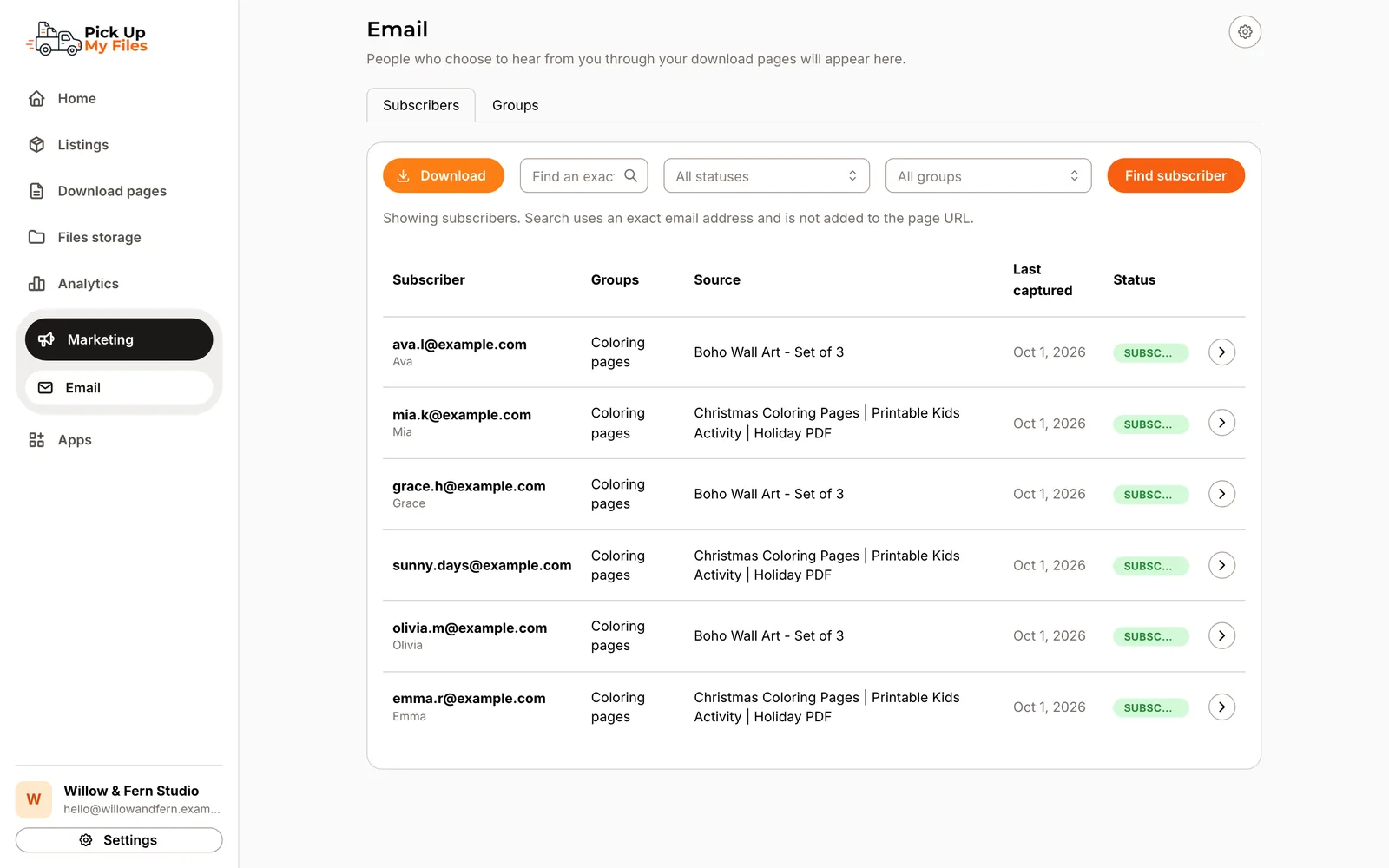
Every signup appears in your subscriber list in Pick Up My Files. Each email address is one subscriber in your shop. If the same buyer signs up again on another page, the new signup is added to their record instead of creating a duplicate. The record keeps when and where they signed up and their consent history.
If someone asks to be removed, look them up by email and delete them.
Step 5: Export to your email tool
When you’re ready to send, download your subscribers as a CSV or Excel file, all of them or one group, and import the file into the email tool you already use. Your list keeps growing on the download page while you write.
Send emails that bring buyers back to Etsy
Your welcome email does most of the work. Send it straight after you import new subscribers, with:
- The free gift, or a link to it.
- A short introduction to you and your shop.
- What they’ll get from you, and how often.
- One link to a related Etsy listing or shop section.
After that, keep emails short and useful: new releases, seasonal reminders such as next year’s planners in the fall, how-to tips, and the occasional Etsy promo code created in Sales and discounts.[3]
Point every product link to your Etsy listing. Etsy’s Seller Policy, in the version effective July 9, 2026, prohibits offering discounts or incentives to purchase through another website or channel.[4] It also keeps things simple for buyers, who already know how to buy and download on Etsy.
Two habits keep the list healthy:
- Follow the legal basics. In the United States, the FTC’s CAN-SPAM guide says every marketing email needs a valid physical postal address and a clear way to opt out, and opt-outs must be honored within 10 business days.[5] Most email tools add the footer, but check it.
- Measure what you can. Use a separate group for each download page, and you’ll see which products bring in signups. Create one Etsy promo code just for your emails, and its results in Sales and discounts show how many purchases used it.
If you’re not using Pick Up My Files yet
Most shops today deliver with a thank-you PDF built by hand for every listing, linking to a shared Drive folder, and some add a newsletter line to that PDF. For a list, it falls short. The invitation is baked into every PDF, so changing it means rebuilding each one, and buyers who bought earlier never see it. The folder looks like everyone else’s, and nothing on it shows buyers more of your shop.
Until you have a download page, two Etsy settings can carry a short, optional invitation to a signup page in your email tool. Etsy shows the Message to Buyers for Digital Items on the Downloads page,[6] and your shop About section has a place for links.[7] Make sure the signup form says what subscribers get, starts with an unticked consent box and links to a privacy notice.
Building an email list from Etsy: FAQ
Can I add my Etsy buyers to my email list?
Only if they sign up themselves. Etsy says sellers may not add customers to a mailing list without consent, and should never copy email addresses from Etsy orders.[1]
Do buyers have to join to get their files?
No, and they never should. On a Pick Up My Files download page the signup is optional and the files are there either way. If you invite buyers any other way, keep the same rule: never hold back paid files until someone joins.
Can I send my list a discount code?
Yes, if it’s an Etsy promo code for buying on Etsy. A discount for buying through another website isn’t allowed.[4]
Start your list on your download page
Start free with branded download pages, then add Email capture on Growth or Pro when you’re ready to grow your list. See how Email capture works.
Sources
[1] Etsy Community announcement: We’re making a few updates to protect users’ privacy (mailing list consent; dated to February 2024 by Shiptheory)
[2] Value Added Resource, November 2026 (quotes the Seller Policy wording on promotions in Messages)
[3] Etsy Help: How to Set Up Sales and Discounts for Your Shop
[4] Alura: Etsy requires Custom Orders to collect extra payment after checkout from July 9, 2026 (Seller Policy wording on discounts through another website or channel)
[5] FTC: CAN-SPAM Act, A Compliance Guide for Business
[6] Etsy Help: How to Add or Edit Your Post-Purchase Message to Buyers